
HTB Write-up | Horizontall (user-only)
Write-up for Horizontall, a retired HTB Linux machine.
Write-up for Horizontall, a retired HTB Linux machine.
pytm is a OWASP tool that integrates with a custom GPT to make the threat modeling process quicker and more automated. I've developed a custom Github Action that, on every Pull Request event, generates or updates a Threat Model report, based on changes to the Python files generated

Write-up for FormulaX, a retired HTB Linux machine.
Write-up for Blazorized, a retired HTB Windows machine.

Write-up for iClean, a retired HTB Linux machine.

While testing an API that was exposed to the Internet, I found an unauthorised SSRF vulnerability that allowed me to trick the server into performing any GET request using http or https protocol. I had access to the response (i.e.: this wasn't a blind SSRF), full control

Write-up for Vessel, a retired HTB Linux machine.

In this article, I go through the scenarios in which I've been able to exfiltrate data from real Android applications, after detecting a WebView takeover (aka "Open Redirect") vulnerability.

Neither DataStore nor SharedPreferences should be used to persist sensitive data ... but as we know, Insecure Data Storage is one of the most common vulnerabilities found in mobile applications.

Write-up for Paper, a retired HTB Linux machine.

I'm helping an organisation that has a very simple (and very static) corporate website. They were interested in adding a contact form, and wanted the data to be sent to their APEX-managed database. Building an entire back-end service for this purpose seemed like too much work, so I
Retired machine can be found here. Scanning As always, we start by mapping the previse.htb hostname to the given IP: ~ sudo nano /etc/hosts 10.10.11.104 previse.htb The nmap scan is pretty boring, it seems there's a web server running on port 80 and
Retired machine can be found here. Scanning Like with most HTB machines, a quick scan only disclosed SSH running on port 22 and a web server running on port 80: ~ nmap 10.10.11.100 PORT STATE SERVICE 22/tcp open ssh 80/tcp open http ~ nmap 10.10.11.
android
Retired machine can be found here. esketit Let's start with some basic scanning: ~ nmap -A 10.10.10.247 PORT STATE SERVICE VERSION 2222/tcp open ssh (protocol 2.0) | fingerprint-strings: | NULL: |_ SSH-2.0-SSH Server - Banana Studio | ssh-hostkey: |_ 2048 71:90:e3:a7:c9:5d:83:66:

Enumeration Enumeration should always start with the App Manifest, which can be extracted from any .apk with a tool such as apktool, e.g.: ~ apktool d com.twitter.android_2021-10-22.apk I: Using Apktool 2.5.0 on com.twitter.android_2021-10-22.apk I: Loading resource table... I: Decoding AndroidManifest.
htb
Retired machine can be found here. Scanning Let's start the same as always, with a basic nmap scan: ~ nmap -sC -sV -A 10.10.10.238 Starting Nmap 7.91 ( https://nmap.org ) at 2021-05-01 11:15 WEST Nmap scan report for 10.10.10.238 Host is

deep links
Preventing Deep Link Hijacking When it comes to preventing Deep Link Hijacking, the message is simple: stop using Scheme URLs and start using (properly verified) App Links or Intent URLs. [If you're lost maybe you should go back to Part 1] As of August 2021 only about 6%

android
So .. what else can we do with deep links? Local File Inclusion (LFI) In part 2 we saw how to achieve LFI via the WebView.loadUrl method. In this part we'll explore an alternative that doesn't require the application to contain a WebView. Let's
ipa
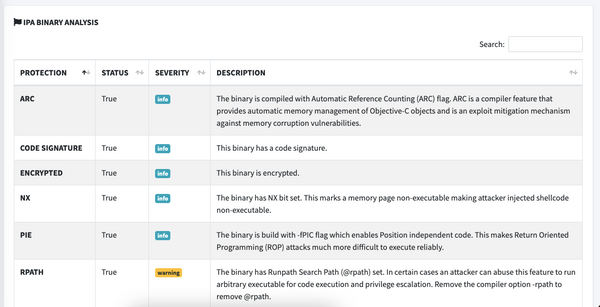
MobSF is an open source static and dynamic analysis tool for Android and iOS, which can be used to quickly detect major issues on your mobile application. When scanning an .ipa, the "IPA Binary Analysis" section can report multiple issues that can be hard to interpret. Hopefully this

android
In this part, we're going to start to answer the question: "What can you do if you can trick a user into clicking a malicious deep link?" Let's go back to the ABC Bank example. ABC Bank has both a web and an Android

android
Deep links are an often overlooked way to exploit Android applications. In this series I hope to do a deep dive into their history, common vulnerabilities with real-life examples, possible mitigations, and testing techniques for pentesters and researchers. In this first part, we do a quick overview of the supported
tshark
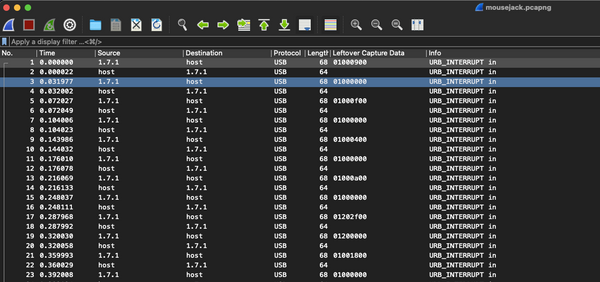
During a recent CTF I had to extract keys from a USB Keyboard capture, and (as usual) decided to create a simple Python 3 script to parse the original keys. As shown on the Gist below, this script takes any .pcap file and optionally the path to the tshark executable,

bloodhound
Edit: This article is now outdated, I recommend that you follow the instructions at https://bloodhound.specterops.io/get-started/quickstart/community-edition-quickstart to install the latest version of Bloodhound on macOS. On a recent CTF I needed to set up Bloodhound on macOS and came across some issues. Hope this helps

oposec
URL: https://20.56.49.147/ | Keep calm and get the flag :) When you enter the IP directly on the browser you see only an image sourced from Github and a hidden clue: "Lost? It's evolution, baby...": The image shows the evolution of the HTTP protocol,